


INTRODUCTION
In the fast-evolving world of AI, Google Gemini has become a powerhouse for generating stunning visuals. However, as any power user knows, the “save as” game gets old fast. If you are generating hundreds of images for projects, you need more than just a right-click—you need a system.
Enter the Gemini Image Downloader, the essential Chrome extension designed to turn your AI workspace into a high-speed production line.
What is Gemini Image Downloader?
The Gemini Image Downloader is a specialized browser extension built for creators who rely on Google Gemini. It simplifies the process of exporting AI-generated images by removing manual hurdles. Whether you need to strip watermarks, organize folders, or download an entire library at once, this tool is the bridge between AI generation and local file management.
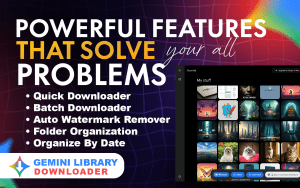

Key Features that Supercharge Productivity
This isn’t just a “save” button; it’s a full-scale export engine. Here is what makes it a must-have:
📥 One-Click Gemini Image Download
Stop right-clicking and inspecting code. This feature lets you download any image from your Gemini chat or gallery with a single click.🗂 Complete Gemini Library Download
Want to back up all your past creations? This feature allows you to download your entire Gemini image library efficiently, keeping your projects safely stored locally.📦 Batch Image Download (Premium Feature)
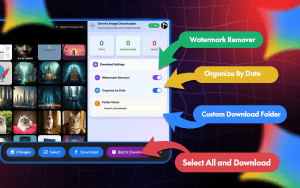
The ultimate time-saver. Select and download multiple Gemini images at once. This is a game-changer for anyone running high-volume AI generation workflows.📂 Custom Download Folder Selection
Take control of your file system. Choose exactly where your images are saved—organize them by client, project, campaign, or date, right from the download prompt.🗃 Smart Auto Organization
Let the extension do the filing for you. Automatically structure your downloads into organized folders, ensuring clean and manageable file management without any extra effort.⚡ Optimized Image Export Engine
Built for stability and speed, this engine handles high-volume downloads smoothly, ensuring you can export large batches of images without crashes or slowdowns.
Who are Gemini Image Downloader Tool For?
Gemini Image Downloader is built for anyone who relies on Google Gemini for image creation. If you fall into any of these categories, this tool is for you:
🎨 AI Image Creators & Hobbyists
🧠 Prompt Engineers testing variations at scale
📈 Digital Marketers creating visuals for campaigns
🛍 Print-on-Demand Sellers managing product designs
📷 Stock Contributors uploading to agencies
📱 Content Creators & Social Media Managers
⚙ Automation Builders integrating AI into workflows
🏢 Agencies managing large AI image libraries for multiple clients
Why Use Gemini Image Downloader? The Core Benefits
Why waste time on manual processes when you can automate? Here’s what you gain:
⚡ Massive Time Savings: Turn hours of manual downloading into minutes. Let the tool handle the grunt work while you focus on creating.
🧠 Eliminate Digital Clutter: No more messy downloads folders. With custom folders and smart organization, you’ll always find the image you need.
🚀 Scale Your Workflow: Unlock the ability to generate and download hundreds of images efficiently, making high-volume projects feasible.
🛡️ Reliable Backups: Easily download and back up your entire Gemini library, ensuring your valuable work is never lost.
How to Use It.
Install: Go to Chrome Web Store and search for it. Add the extension to your device.
Generate: Head over to Google Gemini and start creating your images.
Use of its features: Use the integrated downloader icon to save individual images for your entire session, and watermark removal, etc.
Conclusion: Take Control of Your AI Image Library
Google Gemini handles the creation, but Gemini Image Downloader handles the rest. It’s the essential companion for anyone serious about AI image generation.
Stop wrestling with your file system and start enjoying a streamlined, organized, and fast workflow.
👉 [Install Gemini Image Downloader] and turn Google Gemini into the structured, bulk image download system it was always meant to be.